3.4
Trial version
PUB Viewer Pro
An efficient viewer of MS Publisher files

What will happen when you click Download?
Trial version
16.0.15128.20280
Windows
Windows 7
English
1.2M
7.42 MB
Efficient and Streamlined Software to Create and Edit PDF Files

Zoom Rooms for Business - Advantages of Using Microsoft Office Suites

A free and feature-rich PDF editor

A free open-source office suite for PC

Full PDF suite

Enhance Your Presentations with ZoomIt Portable

Sophisticated Data Reports

A reliable spreadsheet classic built for productivity
Microsoft Publisher 2013 is essentially a graphic design tool. It may be like Microsoft Word in terms of functionality, but Publisher emphasizes more on page design and layout instead of formatting and word composition. The application offers less expensive and easy-to-use publishing options to create designs.
Publisher 2013 comes in bundled in with Office 2013. It, therefore, isn’t free. Also, you must buy the Office 2013 Professional version to access Publisher since it’s not part of the Office 2013 Home and Business or Home and Student version. The other route is buying Office 2013 and subscribing to Publisher 2013 via Office 365.
As aforementioned, buying Office 2013 is mandatory to access and use Microsoft Publisher 2013. And the reason for this could probably the seamless integration the tool experiences with other Microsoft products.
Microsoft Publisher 2013 is an entry-level application for small businesses, and also home users. It is right for firms who cannot afford or are not willing to buy an expensive publishing program, primarily because they have limited desktop publishing experience.
To work with Publisher 2013, you need not be a professional graphics designer. All that is needed is some basic knowledge of Publisher and a bit of creativity. And if you’re willing to learn and work your way up from there, you can truly create great, stunning-looking publications.
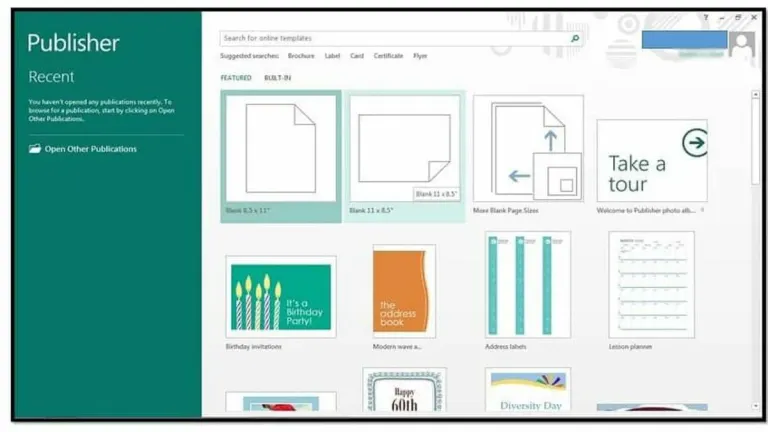
The program is user-friendly and easy to use. If you are a new user or who has not done any kind of graphic designing work before, the included tutorial should help you get the hang of things. And if that doesn’t work, then there are always those ready-made templates that you can use anytime.
Publisher 2013 is the best Publisher version yet. It imports all the great features of past Publisher versions and also comes up with some new features that add more functionality to the tool and make it more refined. You can now insert images from external sources such as Flickr and Facebook, insert multiple pictures simultaneously into the scratch area, swap pictures and use picture backgrounds, add special effects atop pictures and text, etc.
Publisher 2013 comes with more than 700, diverse templates for common business designing requirements such as brochures, business cards, calendars and address labels. Users can also choose to work from scratch. Microsoft provides the option to mail the file directly, export the file as another type of file, or have the file uploaded to the cloud for online publishing.
Publisher 2013 works seamlessly with other Microsoft products such as Word and Excel. But it could face issues with some non-Microsoft products. For instance, it cannot import or open popular file varieties such as Photoshop PSDs or PDFs. Files can be saved to PDF, but those PDFs won’t be editable.
Graphic designing is limited and professionals may find working with Publisher 2013 quite challenging. You can execute simpler effects like bevels, 3D extrusions, and basic shapes. However, more advanced work such as touching up of photos or crafting logos exactly the way you want won't be possible.

Integrated suite for everyday office work

Free office suite for increased productivity

Manage PDF documents
A PDF Reader Tool That Does More Than Just Reading
A comprehensive PDF reader with multiple tools

Your intelligent writing assistant for Microsoft Office

Text entry across languages
A multifunctional PDF editor for PC
Microsoft’s virtual desktop infrastructure

Your all-in-one office suite

Prevent unwanted changes with Tweakeze
The foundation of modern digital productivity